
Why Register On Big Mumbai
Creating a Big Mumbai account unlocks the full platform in one step — a wallet for deposits and withdrawals, the complete game library, and every promotion currently running, starting with a first-deposit welcome bonus of up to 288%. There's no separate sign-up for the app versus the browser, so the account you create here works immediately on both, with your balance and history staying in sync no matter which one you play on. Registration takes under a minute and doesn't ask for anything beyond a phone number and a password you choose yourself — no document upload, no waiting period, no approval queue to sit in before you can play. If you're arriving here after reading about the games, the bonuses or the app on other pages of this site, this is the one step that actually turns that into a working account.
How To Register, Step By Step
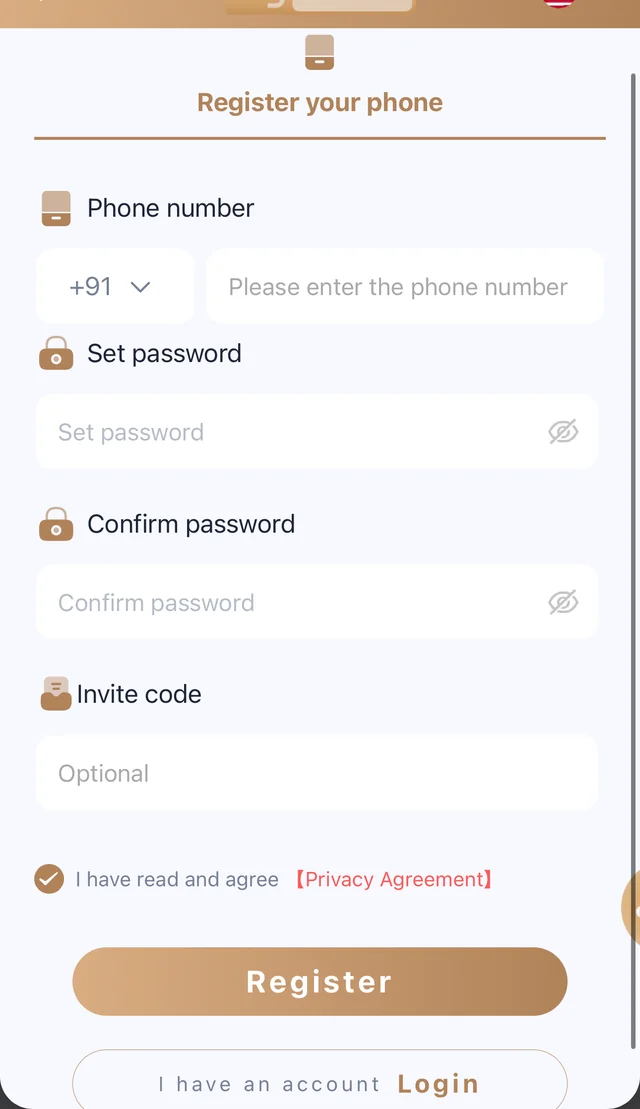
Tap Register, enter your mobile number with the correct country code, then set a password you'll remember and confirm it a second time. If a friend referred you, add their invite code in the optional field — it's what links your first deposit to their referral reward, and it's the only field on the form that isn't required. Read and accept the terms checkbox, then tap Register to finish. Your account and wallet are ready the moment the form submits, and you can log straight in with the same phone number and password from that point forward, on any device.
Using An Invite Code
An invite code is entirely optional, but if someone shared one with you, entering it during registration is the only time it can be applied — it can't be added retroactively once your account exists. Invite codes typically unlock an extra bonus for you as the new player, on top of crediting the person who referred you with ongoing commission on your future play. If you don't have a code, you can simply leave the field blank and register normally; it has no effect on your ability to create an account, deposit or play any game in the library.
What You Get After Registering
The moment your account is created, your wallet is live and ready for a first deposit. That first deposit is where the welcome bonus applies, boosting your starting bankroll by up to 288% depending on the current promotion terms listed on the Promotion page. From there, every subsequent deposit can qualify for daily cashback, and sharing your own invite link opens up referral commission — up to 85% — on friends who register using it. New accounts also start at the base VIP tier, with perks that improve automatically the more you play, no separate application required.
Keeping Your New Account Secure
Choose a password you don't reuse elsewhere, and keep the phone number on your account current — it's the one detail that lets you recover access if you ever forget your password later. Big Mumbai will never ask you to share your password over Telegram, email or any channel outside the official login page, so treat any message requesting your credentials directly as fraudulent. Transactions on the platform run over encrypted connections, and withdrawal requests go through verification before funds move, which is the same baseline you'd expect from any platform handling real deposits and withdrawals.
After You Register: Next Steps
Once your account exists, the fastest way to start playing is to make your first deposit and claim the welcome bonus before it's applied automatically on qualifying deposits. From there, browse the game categories — Aviator-style crash games, Win Go colour prediction, slots, cricket betting, fishing, roulette, lottery and live game shows all sit inside the same lobby. If you'd rather play from your phone without a browser tab open, the Download App page has the official Android APK, with a full step-by-step install walkthrough on the APK Install Guide if this is your first time installing an app outside the Play Store.
Common Registration Mistakes To Avoid
The most common reason a registration form gets rejected is a phone number entered without the correct country code, or with a stray space or digit left over from copy-pasting it from somewhere else. Double-check the number before submitting, since it's also the detail your account recovery depends on later. Choosing a password that's too short or reusing one from another account is a second common slip — pick something you haven't used elsewhere, since a unique password is the single biggest thing you control over your own account security. If an invite code doesn't seem to apply, make sure it was typed exactly as shared, including any leading zeros or capital letters, since codes are usually case-sensitive.
Registering On Mobile vs Desktop
The registration form works identically whether you're on a phone, a tablet or a desktop browser, and the account you create is never tied to the device you used to sign up. That means you can register on a desktop browser out of convenience and then log in on the Android app later with the exact same phone number and password, and your account will already be fully set up and ready to deposit. If you're registering on mobile and plan to install the app afterward, there's no need to register twice — one account covers both, and the Download App page explains how to get the APK once you're ready to move off the browser entirely. Whichever device you start on, keep your login details somewhere you can find them, since that's what gets you back into the same wallet from anywhere else later.
Already have an account? Log in to Big Mumbai.